Crafting Brand Magic with a Fox Laser Cut Design
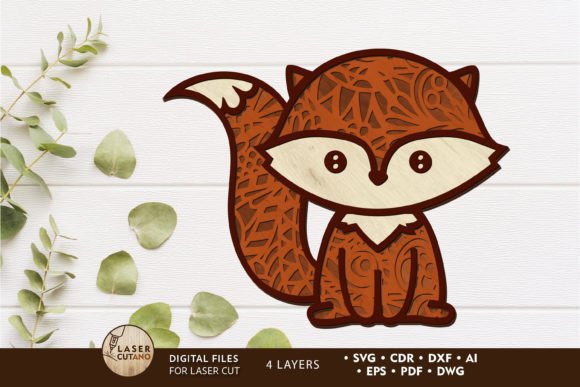
Opening the FOX Decorative Laser Cut Template files, my first impression is immediate delight. The layered, whimsical fox illustration doesn’t just depict an animal; it evokes a feeling. It’s a design asset that instantly communicates playfulness, warmth, and a connection to nature. This isn’t a generic graphic. It has character. For a brand looking to build an emotional bridge with an audience, that initial mood-setting power is invaluable.
From Digital File to Campaign Hero: A Real Marketing Scenario
Let’s frame this review around a real project: a small business, perhaps a handmade candle maker or a children’s book author, is launching a new “Forest Collection.” They need campaign visuals that feel cohesive, professional, and captivating across their website, social media, and packaging inserts. The FOX Decorative Laser Cut Template becomes a central visual thread.
This creative design asset isn’t just for laser cutting physical decor. Its digital multilayer nature means we can extract elements for social media graphics, use the silhouette for a product label, or employ the full illustration as a hero image for the launch announcement. The workflow starts here: this one digital product feeds a multitude of marketing visuals.
The Emotional Tone: Casual Charm with Professional Polish
The design strikes a perfect balance. It feels approachable and cute—ideal for lifestyle content, handmade product branding, or family-oriented event promotions. Yet, the clean lines and intentional layering give it a polished finish that elevates it above typical clipart. This means it can support professional branding for a small business without appearing overly corporate or sterile. It brings the wonder of the animal kingdom into the commercial sphere with grace.
Where This Fox Design Strengthens Your Brand Communication
In practical application, this template excels in creating visual consistency. Here’s where I’d deploy it in a campaign:
- Social Media Graphics: The fox as a focal point for Instagram posts or Pinterest pins about the “Forest Collection.”
- Packaging Accents: A simplified version laser-cut or printed as a decorative insert for product packaging.
- Website & Email Headers: As a captivating banner graphic, establishing the campaign’s theme immediately.
- Printable Promotions: Integrated into event flyers or posters for a local market stall.
- Content Bundles: As a decorative element in a digital lead magnet, like a downloadable forest-themed activity sheet.
Each use reinforces the same emotional connection and narrative, building stronger recognition for the launch.
Supporting Core Marketing Goals with Visual Hierarchy
A key strength is how this asset supports clearer visual hierarchy. Its intricate but open design allows text to be placed alongside or within it without creating a messy composition. This is crucial for digital ads or blog graphics where the message must remain paramount. The fox can attract attention, but it doesn’t overpower. It facilitates a stronger first impression and, by maintaining a clean layout, contributes to improved audience trust through a professional appearance.
Practical Spaces for Maximum Impact
For campaign headers, product launch visuals, and branded templates (especially in tools like Canva), this design works best as a hero graphic. It’s ideal for establishing theme and mood at the top of a page or post. As a decorative brand element on merchandise or stickers, it extends brand identity into tangible items.
Considerations for Strategic and Safe Usage
As a brand designer, I must note where to use this asset carefully. Its decorative nature means it’s less suited for formal corporate branding for a financial service, for instance. On dense information layouts, like a complex comparison chart, it might add unnecessary clutter. When used in small mobile graphics, ensure key details remain visible. Always test it on a low-contrast background to guarantee it stands out. Most importantly, in text-heavy ads, ensure it complements, not competes with, the core message.
Essential Brand Designer Pre-Campaign Checks
Before hitting publish on any campaign using the FOX Decorative Laser Cut Template, run these tests:
- Color Palette Test: Place the design against your brand’s primary colors. Does it harmonize or clash?
- Typography Pairing: How does it look alongside your fonts? Test with a sleek sans serif for a modern mix, a classic serif for warmth, and even a playful script font. Balance is key.
- Real Mockups: Drop it into actual social media post mockups, a website header wireframe, and a packaging template. Preview it on a mobile screen.
- Readability Check: If using scaled-down versions, confirm details are not lost and text overlays remain legible.
- Competitor Context: Compare your visuals using this asset against competitor campaigns. Does it help you stand out?
- License Confirmation: Always verify the commercial license terms. Ensure it’s cleared for use in paid client work, business branding, and all your intended commercial design applications.
These steps transform a delightful graphic design asset into a reliable, strategic tool for content marketing.
Final Thoughts: A Versatile Asset for Creative Entrepreneurs
The FOX Decorative Laser Cut Template, from the category of other home decor and perfect for laser cutting, transcends its intended craft use. For brand owners, content creators, and digital sellers, it’s a multipurpose illustration that can anchor a visual campaign. It attracts an audience valuing charm, quality, and narrative. It supports goals of engagement and memorability. By applying it thoughtfully—mindful of its best uses and its limitations—you can build more consistent branding and create more memorable campaign visuals. It’s not just a file; it’s a building block for your brand’s visual story.